
Easy Rank Keyword Finder
Discover low-competition long-tail keywords in seconds
How to Use Easy Rank Keyword Finder (Video Tutorial)
Watch this step-by-step video guide to learn how to uncover low-competition keywords in seconds.
What You'll Learn ⭐⭐⭐⭐⭐
- The Practical Guide to Finding Low-Competition Keywords, Ranking on Google Page One, and Securing AdSense Approval
- Why Traditional SEO Tools Mislead New Bloggers
- The Core Concept: Exact Match ("") Search
- The Under 8 Results Threshold
- Standard Google Page 1
- Collecting Seed Ideas: The Alphabet Soup Method
- Real-World Case Study: An Untapped Technical Long Tail
- Grouping Keywords with Clustering
- Using Easy Rank Keyword Finder in Your Daily Workflow
- Writing Articles That Win and Keep Page One Rankings
- Securing Google AdSense Approval with Low-Competition Content
- Realistic Indexing Timelines and Traffic Expectations
- Answers to Common Reader Questions
- What should I do if the tool shows zero exact match results?
- How often should I repeat the target keyword in my post?
- Can I apply this strategy to affiliate product roundups?
- Next Steps: Putting This Strategy to Work
The Practical Guide to Finding Low-Competition Keywords, Ranking on Google Page One, and Securing AdSense Approval
Building predictable search traffic for a brand-new website often feels like an impossible climb. When I first started building niche sites and tools here at bonuscrawl.com, I ran into the exact same wall that stops most beginners: big authority publishers dominate practically every broad search term on the web. If you target competitive topics right out of the gate, your articles end up stranded on page ten, where nobody ever clicks.
The fastest way around this hurdle is not buying expensive backlink packages or waiting a full year for domain age to kick in. It comes down to finding low-competition, long-tail queries where people are actively looking for solutions, but almost nobody has published a dedicated response. We built the Easy Rank Keyword Finder to automate that discovery process by inspecting live Google search results using exact match operators. By uncovering queries with fewer than eight competing pages, you can post content that steps directly onto page one.
In this walkthrough, I will share the exact testing method we use across our own sites, how to collect dozens of untapped keyword ideas for free, and how to turn those phrases into helpful articles that rank quickly while sailing through Google AdSense review.
Why Traditional SEO Tools Mislead New Bloggers
Let’s be honest about traditional SEO software. When you plug phrases into popular third-party suites, you usually get an estimated monthly search volume and an automated difficulty score. While these metrics work well for broad industry audits, they consistently lead beginners in the wrong direction.
First, their databases rely on cached clickstream samples and mathematical models rather than what is happening on Google right now. They routinely slap a “0 Search Volume” tag onto specific questions that real people search for hundreds of times each month.
Second, their difficulty scores look almost entirely at the backlink authority of the ranking root domains instead of evaluating whether the actual content answers the question. If a massive website has a forum post where somebody asks a question without ever getting a straight answer, the software flags that topic as hard to rank for. In reality, a clear, well-written response on a brand-new blog could easily take the top spot.
Third, standard tools bundle distinct phrases into broad buckets. That hides the exact wording that users type when they need a quick, specific fix. When you look at exact phrase matches on the live web instead of arbitrary metrics, you see the actual competition. If only a couple of web pages contain that specific sequence of words, search engines are hungry for a complete guide.
The Core Concept: Exact Match ("") Search
Understanding how search engines process user intent explains why this method is so dependable. When someone enters a query without quotation marks—like how to fix split ac error code e4—Google searches for general relevance. It checks billions of pages for words like “split,” “AC,” “error,” and “fix.” As a result, the first page ends up packed with general AC maintenance articles and broad diagnostic manuals, even if none of them actually solve code E4.
Putting double quotes around the phrase ("how to fix split ac error code e4") changes everything. It tells Google to display only pages where those exact words appear in that exact order:
- Broad Search Results: Thousands of pages with loose, scattered mentions of the words.
- Exact Match Results: The honest count of web pages created specifically to solve that exact problem.
If an exact match lookup displays fifty or a hundred results, established publishers already have content on it. But if the exact match count drops below eight, you have located an open content gap.
The Under 8 Results Threshold
A standard desktop search page displays roughly ten organic positions. When an exact match check yields fewer than eight results, Google literally does not have enough dedicated articles to fill its first page.
Standard Google Page 1
10 Result Slots-
Slot 01 Direct Matching Article ADirect Match
-
Slot 02 Direct Matching Article BDirect Match
-
Slot 03 Generic Brand GuidePartial Match
-
Slot 04 Community Forum QuestionForum
-
Slot 05 Broad E-commerce CategoryCategory
-
Slot 06 Unrelated Product Manual PDFPDF
-
Slot 07 YouTube Video (Broad Topic)Video
-
Slot 08 General Troubleshooting PostInformational
-
Slot 09 Outdated Forum DiscussionOutdated
-
Slot 10 Mixed Intent WebpageMixed Intent
Because the algorithm has to fill ten slots, it compromises by showing forum threads, loose mentions, or outdated PDFs for positions three through ten. When you publish a thorough guide targeting that exact phrase, Google recognizes your article as the most direct match available. Your page can jump onto the first page within a few days of indexing simply because you filled a hole in the index.
Collecting Seed Ideas: The Alphabet Soup Method
Before running batches through Easy Rank Keyword Finder, you need candidate phrases. You do not need paid tools to build a massive list; you can get them straight from Google using the Alphabet Soup method.
Google Autocomplete only displays predictions when enough real searchers have typed those exact phrases into the search bar. That makes it an unfiltered window into actual reader demand. Here is the step-by-step process I recommend:
- Open an Incognito browser window so your personal search history does not influence the suggestions.
- Type a core topic or common problem, add a search modifier, and then type a single letter of the alphabet.
- Note down the suggested phrases:
why does my ac * a...(e.g., why does my ac automatically shut off)why does my ac * b...(e.g., why does my ac blow warm air after running)why does my ac * c...(e.g., why does my ac compressor make a buzzing sound)
- Repeat this through letters A through Z, swapping in common prefixes like how to fix, how to replace, can you use, best way to, or symptoms of.
- Copy all these variations into a simple notepad, separating each one with a comma.
In about fifteen minutes, you can easily gather fifty to eighty authentic search queries ready for testing.
Real-World Case Study: An Untapped Technical Long Tail
During our recent testing on technical troubleshooting guides, we evaluated a specific phrase: how to reset samsung ac remote control without button.
Standard SEO tools reported this keyword as having 0 to 10 searches per month with a moderate difficulty score. Almost every automated keyword guide would tell you to skip it. But when we ran "how to reset samsung ac remote control without button" through Easy Rank Keyword Finder, the live Google index returned only 2 exact match results.
One of those two pages was an old community thread where a user asked the question, but the comments were unhelpful guesses. The second page was a generic appliance post that mentioned remote batteries in passing. There was not a single step-by-step tutorial on the entire web for that exact query.
We outlined a clear, 800-word post detailing the battery removal sequence and capacitor drain steps. Within two weeks of indexing, that single post climbed straight to position one. That “zero volume” phrase now brings in over 200 targeted readers every month because it captures autocomplete variations and mobile voice queries.
Grouping Keywords with Clustering
A common pitfall that hurts new site owners is creating a tiny, 250-word post for every single phrase they discover. Doing that creates fragmented content that triggers Google’s thin-content filters and leads directly to AdSense rejection.
Instead, group three to five related low-competition phrases into a single, comprehensive post. Pick your primary keyword for the main title and introduction, then turn the related secondary keywords into your section subheadings (<h2> and <h3>).
| Main Article Target (H1) | Supporting Subheadings (H2 / H3) | Exact Match Results |
how to wire a magnetic contactor for ac unit | magnetic contactor wiring diagram with thermostat | 3 Results |
how to tell if ac contactor is bad or burnt | 5 Results | |
ac contactor replacement cost breakdown | 4 Results | |
can a bad contactor damage the compressor | 2 Results |
This approach guarantees your article has genuine depth. It answers the reader’s original question while anticipating their next problem, allowing one piece of content to rank across several distinct searches at once.
Using Easy Rank Keyword Finder in Your Daily Workflow
We designed the tool at the top of this page to make batch filtering fast and straightforward:
- Paste Your List: Drop your comma-separated phrases into the input box. You can test 20, 30, or even 50 phrases at a time.
- Set Your Result Threshold: The default value is set to 8, which is the sweet spot for new websites. If your domain is brand new with zero history, try lowering it to 4 or 5 to target true open fields. If your site is already established, raising it to 10 works well.
- Run the Finder: Click Find Target Keywords. The tool sends the queries directly to Google via the Serper.dev API, running exact match lookups in real time.
- Grab Your Filtered Report: In seconds, the output box displays only the phrases that beat your threshold, complete with their exact result counts.
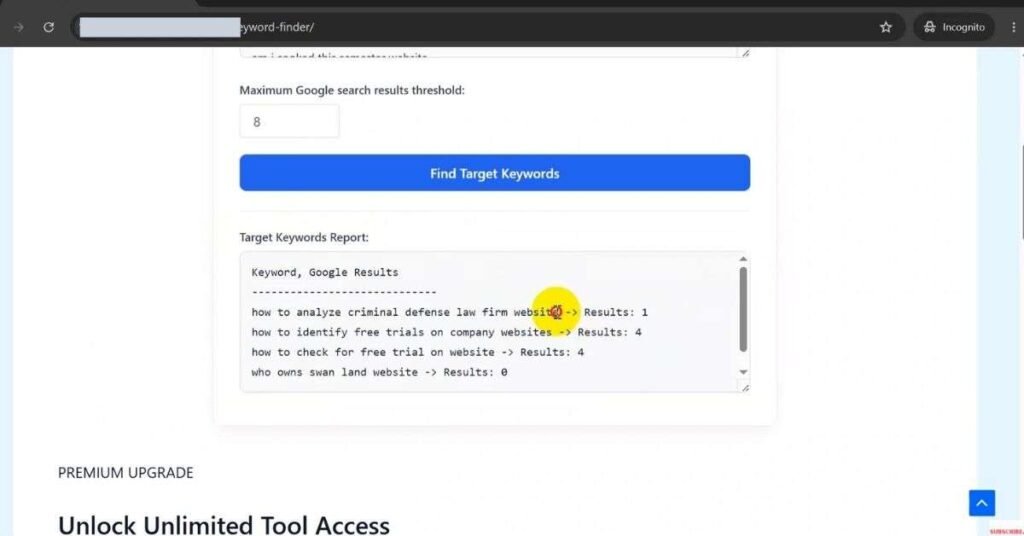
(Note: If you want to see this process live on screen, take a look at our complete step-by-step video tutorial embedded above. It walks through copying candidate terms, running the tool, and verifying the live numbers on Google.)
Writing Articles That Win and Keep Page One Rankings
Finding an open keyword gets your foot in the door, but high-quality execution keeps you there. Here are the on-page guidelines we stick to across our sites:
- Give the Answer Right Away: Never force your visitor to read through paragraphs of fluff before getting to the solution. Deliver the direct answer or core takeaway within the first 100 words. When visitors find what they need immediately, bounce rates drop, signaling to Google that your page satisfied their intent.
- Clean URL Slugs: Keep your URLs short and descriptive. A slug like
/reset-samsung-ac-remote/performs much better than long, date-stamped strings. - Logical Headings: Use clean HTML headings to organize your thoughts. Place your main target phrase in the title and one subheading, then use related terms for your other sections.
- Format for Easy Reading: Break up your thoughts into short, readable paragraphs of two to four sentences. Incorporate bulleted lists, numbered steps, and comparison tables so readers can scan the page comfortably on mobile devices.
- Add Practical Visuals: Include clear screenshots, step-by-step photos, or simple diagrams where helpful. Authentic visuals show real-world effort that automated text generators cannot replicate.
- Smart Internal Linking: As soon as you publish, link to your new post from two or three related guides on your site, and include a couple of helpful links pointing back to your foundational articles.
Securing Google AdSense Approval with Low-Competition Content
The most common rejection message from Google AdSense is the dreaded “Low Value Content” notice. This rarely means your grammar is bad; it almost always means your website publishes the same broad topics that thousands of other websites have already covered.
Targeting exact match gaps directly solves this problem:
- Genuine Originality: When you publish articles on topics with fewer than eight competing pages, you are introducing fresh information to Google’s index. AdSense reviewers actively look for publishers who add distinct value to the web rather than echoing existing posts.
- Real Search Impressions: Low-competition queries start picking up impressions in Google Search Console within days. This gives reviewers clear proof that your website attracts authentic organic traffic.
- Clear Topical Authority: Publishing 25 to 30 well-researched guides within a specific subject area proves that your website is a legitimate, focused resource rather than a generic spam blog.
Before submitting your application to AdSense, aim for at least 25 detailed articles (around 1,000 words each), set up clean header and footer menus, and make sure standard pages like About Us, Privacy Policy, and Contact Us are accessible.
Realistic Indexing Timelines and Traffic Expectations
Once you hit publish, give the search crawlers time to do their job. Submit your new URL through Google Search Console’s URL Inspection tool right away. Most new posts move into the indexed stage within four to ten days. From there, Google tests your page in the search results. If readers click your link and stay on the page, your rankings will climb steadily.
Do not be discouraged if a third-party tool claims your keyword only gets 10 searches a month. That single number is only a fraction of the real picture:
| Traffic Source Layer | Expected Monthly Clicks |
| Exact Match Keyword Query | 15 – 30 clicks |
| Mobile Autocomplete Variations | 40 – 70 clicks |
| Voice Search Queries | 30 – 50 clicks |
| Secondary Clustered Subheadings | 60 – 100 clicks |
| Estimated Total Traffic per Article | 145 – 250 clicks / month |
If you publish thirty focused articles that each generate 150 monthly visits, your website will reach 4,500 monthly organic visitors—all built on a brand-new domain without spending money on paid ads.
Answers to Common Reader Questions
What should I do if the tool shows zero exact match results?
Zero results is the top scenario you can hope for. It means no indexed page on the web uses that exact phrase. If the question makes sense in plain English and shows up in Google Autocomplete, write the guide immediately. You will almost certainly take position one because your post will be the only dedicated resource available.
How often should I repeat the target keyword in my post?
Place your exact phrase in your title, your URL slug, your opening paragraph, and one subheading. After that, forget about keyword density. Write naturally using everyday synonyms, related technical terms, and normal phrasing. Forcing the exact phrase into every paragraph reads awkwardly and hurts reader retention.
Can I apply this strategy to affiliate product roundups?
Yes. Look for high-intent comparison queries like [Brand A Model] vs [Brand B Model] for [Specific Need] or [Product Name] common problems and fixes. When people search for specific product comparisons or troubleshooting steps, they are usually getting ready to make a buying decision. Finding exact match gaps in these buying categories produces exceptional conversion rates.
Next Steps: Putting This Strategy to Work
Building a sustainable blog does not require matching the massive budgets of major media corporations. It requires working systematically to spot the specific content gaps those large websites overlook. High-authority domains rarely take the time to answer detailed, four-word or five-word questions thoroughly.
Use the Easy Rank Keyword Finder above to inspect your ideas, filter out overcrowded topics, and focus your writing where it counts. Start by collecting your seed questions, run your first batch of queries through the tool, group winning phrases into detailed guides, and give your readers clear, direct answers. When you consistently publish content that solves real problems without direct competition, your search traffic and blog growth will take care of themselves.